

If you’ve ever walked through a sun-soaked park, waited for a bus at a stop that’s blasting no extra shade, or grabbed a coffee from a shop that’s set up a digital order station outside on a 90-degree day, you’ve probably stopped to interact with an outdoor touch screen kiosk. As a supplier of these things, I get asked all the time: “How do these things even work out here? The weather, the random people touching them, the fact that sometimes they have to connect to Wi-Fi or a cellular network when there’s no nearby router?” The short answer? Their communication interfaces are basically their lifelines—they’re how they send data, connect to the world around them, and keep working even when the elements are throwing everything they can at the hardware. Let’s break this down, no jargon, just the real stuff I deal with every day when I’m setting these up for clients.
First off, let’s get one thing straight: outdoor kiosks aren’t just indoor models with a weatherproof case slapped on. The communication interfaces have to be built tough, too. If they break, the whole kiosk is useless—whether it’s for checking concert ticket availability, grabbing trail maps in a national park, or ordering food at a food truck lot. One of the most basic, but most important, interfaces is cellular connectivity. I know, some people still think “outdoor” means “Wi-Fi,” but half the time you set up a kiosk on a remote trail, a beach, or a construction site where there’s no Wi-Fi at all. Cellular is non-negotiable here.
The cellular module we use for our outdoor touch screen kiosks is 4G LTE, and we’re starting to roll out 5G for locations that need faster data—like a downtown bus terminal where people are checking real-time departure times and loading transit maps. Why cellular over, say, satellite? Wait, hold on, don’t sleep on satellite—we actually use satellite as a backup for locations where cellular signal is super spotty, like deep in a national forest or a mountain ski resort. The cellular interface is easy to integrate: we just plug in a small, external antenna (mounted on the top of the kiosk so it doesn’t get blocked by rain or snow) and make sure it’s set to auto-switch between the local cellular network and satellite if the signal drops. No one wants a kiosk that goes down when it matters, right?
Next up: Wi-Fi, but not the regular Wi-Fi you have in your living room. Outdoor Wi-Fi interfaces have to handle way more interference. I’m talking about signal bounce from buildings, rain absorbing radio waves, even leaf cover if the kiosk is under a tree. For our outdoor touch screen kiosks, we use dual-band Wi-Fi—2.4 GHz and 5 GHz. The 2.4 GHz band is longer range and works better through obstacles, so we use that for remote kiosks where the Wi-Fi router is a little farther away. The 5 GHz band is faster, so we reserve that for busy downtown areas where multiple people might be using the kiosk at the same time, all streaming data or sending requests. We also enable Wi-Fi 6, which is the newer standard that handles way more devices at once—game changer for places like amusement parks where 10 people could be on a single kiosk network line.
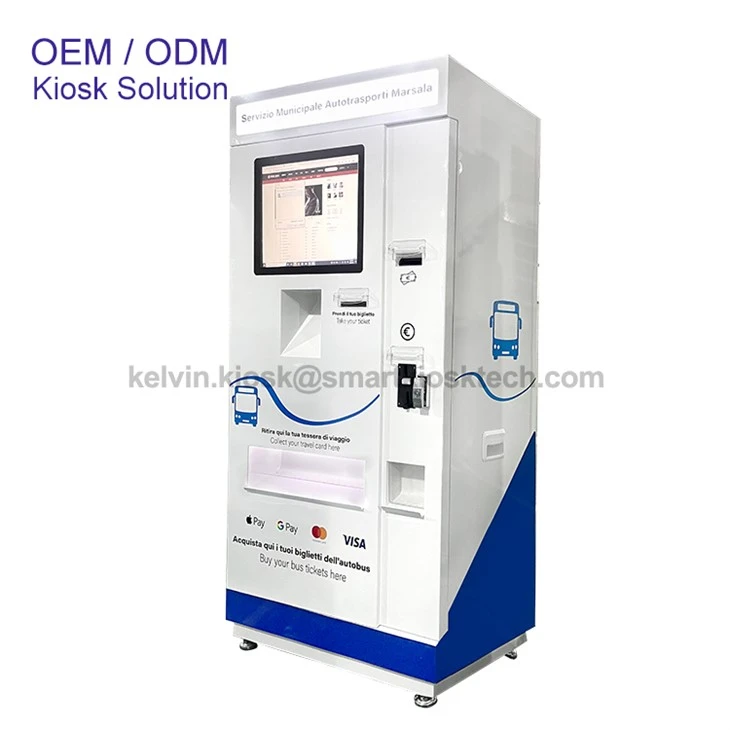

Then there’s Ethernet, the wired network interface. A lot of people think wired is outdated, but for permanent outdoor kiosks that are bolted down in one spot (like a permanent wayfinding station at a city plaza), Ethernet is actually more reliable than Wi-Fi. No more worrying about Wi-Fi signal dropping when it’s windy or rainy. We run a shielded Ethernet cable through a weatherproof conduit (we use those heavy-duty PVC conduits that are buried or mounted low to the ground) and plug it into the kiosk’s Ethernet port. One thing I always tell clients: don’t skip the shielded cable. Outdoor areas have all kinds of electrical interference from power lines, street lights, even other kiosks, and unshielded Ethernet will cut out or slow down like crazy. That’s a mistake I see a lot of new operators make, so we make sure every one of our outdoor touch screen kiosks is built with shielded Ethernet ports as standard.
Now, here’s the part that people usually don’t think about: external peripheral interfaces. The kiosk isn’t just talking to the internet—it’s talking to other hardware around it. Let’s say you have an outdoor kiosk that lets you buy movie tickets at a mall entrance. It needs to connect to a payment terminal, right? That’s a USB interface, but not the flimsy USB-A cords you use for your phone. We use industrial-grade USB ports, sealed with a weatherproof cap so rain or dust can’t get in. For payment processing, we might also use a Serial (RS232) interface for older card readers that clients already have set up—no need to make them replace all their existing hardware just to use our kiosks.
Another peripheral interface we use is Bluetooth. Wait, outdoor Bluetooth? Yeah, it’s possible if it’s built for it. We use long-range Bluetooth modules for things like connecting to a nearby mobile app for a park’s trail system. For example, if someone is at a national park kiosk that has a Bluetooth module, they can connect their phone to the kiosk to download a trail map directly to their device, instead of using their data. The Bluetooth antenna is mounted inside the kiosk, sealed, so it doesn’t get rained on, and we make sure it’s tuned to the right range—like 50-100 feet, enough to cover the plaza around the kiosk but not so far that it connects to random devices across the street.
Wait, let’s not forget about what’s called a “wired serial interface” for things like receipt printers? No, wait, receipt printers are usually USB or Ethernet too, but there’s another big one for outdoor kiosks: contactless card reader interfaces. Those use NFC (Near Field Communication) technology, which is a type of short-range wireless interface. NFC is what lets you tap your phone or your credit card to pay, and we build those right into the front of the kiosk, surrounded by a rubber gasket to keep water out. It works even when it’s raining—we’ve tested that, don’t worry—because NFC doesn’t rely on line of sight, just a close enough connection. That’s why you can tap your wet phone to pay for a soda from an outdoor kiosk without any issues.
Oh, and there’s one interface that’s super important for updates and maintenance, but it’s hidden: the OTA (Over-the-Air) update interface. That’s not a physical port, it’s part of the cellular or Wi-Fi connection. Basically, we can send updates to the kiosk’s software or its communication settings wirelessly, so we don’t have to drive out to a remote trail every time we need to fix a bug or add a new feature. That’s a huge time-saver. Last month, I had a client with kiosks in a state park that needed a new trail map, and we pushed the update over cellular in 10 minutes, no big truck, no climbing a fence to get to the kiosk. Way better than the old days when we had to show up with a USB drive and plug it in.
Wait, let’s circle back to the physical interfaces for a second—because even wireless ones need to be protected, right? All the ports and antennas on our outdoor touch screen kiosks are IP65-rated, which means they’re totally dust-tight and can take direct jets of water from any direction. I’ve had clients test that by hosing down a kiosk with a garden hose (as long as it’s not a pressure washer, but still) and it works. The antennas are mounted on top of the kiosk, under a protective cover, so they don’t get damaged by hail or tree branches. We also seal every port with a rubber or silicone gasket to keep moisture out—no exceptions.
I should also mention that we customize these interfaces for each client, because every outdoor space is different. A kiosk for a beach will need a communication interface that works with the weak cellular signal that’s common near the ocean (salt air can mess with signals, so we use corrosion-resistant antenna connectors). A kiosk for a construction site might need a cellular interface with a stronger antenna because there are so many steel buildings blocking the signal. A kiosk for a downtown plaza can handle 5G Wi-Fi, so we set that up to handle the hundreds of people trying to check bus times or order food from food trucks at lunchtime.
If you’re thinking about getting an outdoor touch screen kiosk, you might be worried about all this stuff—will it work when it rains? Will it connect when there’s no Wi-Fi? Will it stay connected when it’s windy or hot? That’s exactly why we design the communication interfaces to be as tough as the hardware itself. You don’t want a kiosk that’s pretty on the outside but dies because its communication can’t handle the outdoors.
Wait, if you want to see what I’m talking about, check out our outdoor touch screen kiosk page right here.
Now, before I wrap this up, let’s be real: the biggest mistake people make when setting up outdoor kiosks is underestimating the communication needs. They buy an indoor kiosk, throw a weatherproof cover on it, and wonder why it won’t connect to the internet or process payments. No good. The interfaces are the backbone of the whole thing, and they have to be built for the conditions.
If you’re a business owner, a city planner, or someone who’s just curious about these kiosks and wants to work with a supplier that knows their stuff (hint: that’s us), reach out. No pressure, just a chat about what you need. Whether you need a kiosk for a farmers market, a ski resort, or a downtown transit hub, we can build the right communication setup for your space. We don’t do one-size-fits-all—because when it comes to outdoor kiosks, one size definitely doesn’t fit all.
References:
- National Association of Kiosk Manufacturers. "Outdoor Kiosk Communication Standards for Harsh Environments." 2023.
- Federal Communications Commission. "Wireless Interface Specifications for Public Outdoor Digital Devices." 2022.
- Institute of Electrical and Electronics Engineers. "Wi-Fi 6 Performance in High-Interference Outdoor Settings." IEEE 802.11ax Task Group, 2021.
- IP Rating Standards Association. "IP65 Ingress Protection for Outdoor Electronic Interfaces." 2024.


