

If you’ve walked through a mall, airport, or city government office in the last few years, you’ve probably passed one of those sleek, two-screen self-service kiosks that feel way more intuitive than the clunky single-screen ones we all tolerated pre-2020. As a supplier who’s been building and deploying these dual screen self-service kiosks for 6 years, I get asked one question nonstop by potential clients, from small local cafes to huge national retail chains: Are these things actually scalable? Like, can I roll them out to 10 locations, or 100, or even 1,000, without them turning into a maintenance nightmare or a money sink? The short answer is yes—but it’s not just about cramming two screens into a box. It’s about solving the tiny, messy problems no one talks about when they first see a cool demo unit, and building a product that can adapt to every industry, every location, and every last-minute curveball that comes with scaling. Let’s break this down, no corporate jargon, just the real stuff I deal with every week.
First, let’s start with what makes dual screen kiosks different from their single-screen cousins. For anyone who doesn’t know, a dual screen setup lets one screen do the “heavy lifting” while the other handles secondary stuff. Like, if you’re running a payment kiosk, one screen can walk a customer through ordering a burger, customizing it, and adding sides, while the other shows nutrition info, promotional deals, or lets them pay with a tap. For tax payments, one screen guides you through entering your SSN and tax form numbers, while the other displays real-time references to avoid mistakes. For event tickets, one screen lets you pick seats and enter payment, while the other shows a seating map, upcoming events, or nearby concessions. That split is why they’re so popular, but scaling means making that split work no matter where you put the kiosk.
A lot of people think scalability is just about making a bunch of units off an assembly line. But for us, it’s way deeper—especially when you’re dealing with different use cases. Early on, we built a generic dual screen self-service kiosk that worked for a local coffee shop, but when a client from a state tax office asked to adapt it for their needs, we realized that one-size-fits-all doesn’t cut it. Taxes require strict data security, compliance with state-specific forms, and privacy features like a privacy filter on the secondary screen so no one can snoop on your SSN or bank info. That’s why we now have specialized versions, like the Dual Screen Government Tax Payment Kiosk, tailored specifically for public sector needs, and the Double Screen Ticket Self-service Kiosk built for arenas and transit hubs. Each builds on the core dual screen tech but adds modular features that can be swapped in or out depending on the client. That modularity is the first big piece of scalability. If every unit is the same under the hood, you don’t have to rewire or rework every kiosk when a client needs a new feature—you just plug in a new software module or a hardware add-on.
Next, let’s talk about the actual deployment, because scaling stops being easy once you have to put 50 kiosks in different states. When we first started, we’d ship units to a client and send a tech to install and calibrate each one individually. For a 10-location chain, that meant 10 trips, a week of work, and thousands in labor costs. Not scalable. Now, we pre-calibrate every unit in our warehouse, test the software remotely before it even leaves our facility, and ship them with step-by-step video guides that even a part-time facilities manager can follow. We also built a remote monitoring tool that lets us check on every kiosk in a client’s fleet in real time—no need to fly someone out if a screen stops responding or the payment processor glitches. Last year, we deployed 75 units to a national grocery chain in 4 weeks, and only had to send someone out for one minor hardware issue. That’s the kind of efficiency that makes scaling actually make financial sense, not just a buzzword.
But here’s the thing no one tells you about dual screen kiosks: the two biggest scalability headaches aren’t hardware or software—they’re customer experience consistency and maintenance. If you roll out 100 kiosks, 99 work perfectly, but one at a rural gas station is too cold and the touchscreen stops responding, that’s enough to make your whole fleet look unreliable. We dealt with this early on, when a client had 20 kiosks at different mall locations, and 3 developed touch issues in the first 6 months. Turns out, low-quality touch screens that worked in our climate-controlled office broke when exposed to extreme heat, cold, or dust. So we switched to industrial-grade touch screens that can handle temperatures from -20°F to 120°F, and added sealed frames to keep out dust and moisture. Now, our Dual Screen Touch Screen Payment Kiosk has a 98% uptime rate, even in the harshest locations—like a desert gas station in Arizona or a ski resort in Colorado. That consistency is non-negotiable for scaling; clients don’t want to deal with “that one broken kiosk” every time they check their fleet stats.
Customer experience consistency is another big one. If every dual screen kiosk in a chain has a different layout—one has the primary screen on the left, one on the right, one shows promotions on the secondary screen and another shows nutrition—customers get confused. We solved this with a centralized software platform that lets clients update the look, layout, and content of every kiosk in their fleet from one dashboard. Want to change the promotional deals for the weekend? Click a button, and all 100 units update automatically. Need to switch the secondary screen to show COVID safety info? Same thing. We also tested dozens of layouts with real users (not just our in-house team) to figure out the most intuitive split: primary screen for the task at hand, secondary for support or extra info. A recent study we did with a retail client found that this consistent layout cut transaction time by 18% and reduced customer complaints about the kiosk by 30%—data that makes it way easier for clients to justify rolling out more units.
Now, let’s talk about use case versatility, because that’s what makes dual screen kiosks stand out from single-screen when it comes to scaling. A lot of clients don’t just need one type of kiosk—they need to use them across different parts of their business. For example, a big box store might want to use dual screen self-service kiosks for checkout, the Dual Screen Interactive Touch Screen Kiosk for product info and in-store pickup, and later adapt them for returns. Our modular design lets clients repurpose the same hardware for different uses, without buying entirely new kiosks. Last year, we had a hotel client that bought 15 of our units for check-in and checkout, then a year later asked to reconfigure 5 of them to sell local tour tickets—we just swapped out the software and a couple of accessories, no new hardware needed. That flexibility is a game-changer for scalability, because clients don’t have to make a huge capital investment upfront; they can start with a small fleet and add or repurpose as their business grows.
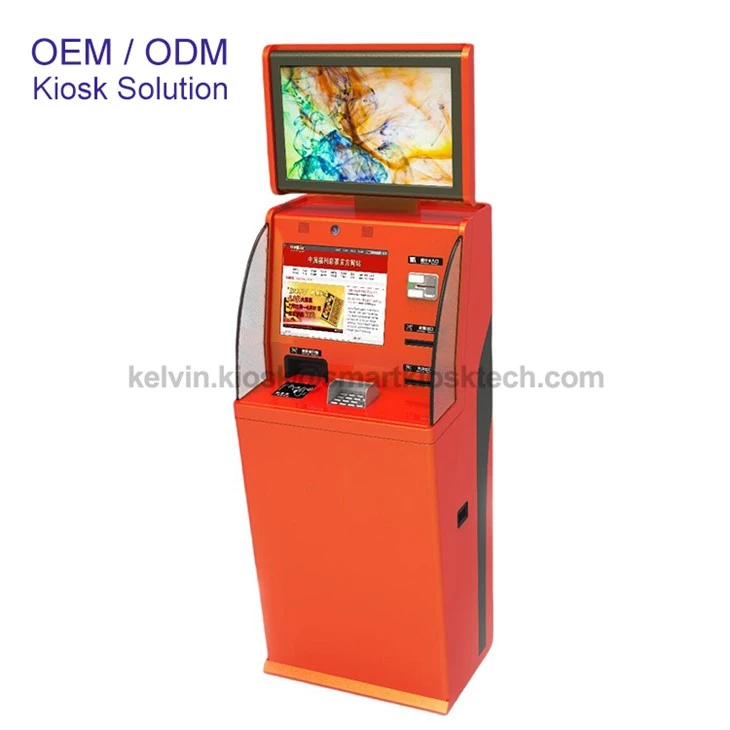

Of course, nothing is perfect, and there are still challenges when it comes to scaling dual screen kiosks. The biggest one right now is payment integration. Different regions have different payment processors, different regulations, and different preferred methods (like tap-to-pay vs. chip and pin vs. mobile wallets). Early on, we had a client in Europe who had to deal with 3 different payment processors across their fleet, and integrating each one took weeks of custom work. Now, we’ve built universal payment APIs that work with all major processors in North America, Europe, and Asia, so integrating payment tools is a 2-day setup, not a 2-week project. We also prioritize security—dual screen kiosks handle sensitive data, from credit card info to tax IDs—so we’re certified with PCI DSS and other global security standards, which means clients don’t have to worry about compliance when rolling out a large fleet.
Another challenge is supporting small businesses vs. enterprise clients. A local café might only need 2 kiosks, while a national bank needs 200. We used to have separate pricing and support models, which made it hard for small businesses to get the same reliability as big clients. Now, we have tiered support and leasing options that let small businesses start with a small fleet and scale up as they grow, without the upfront cost of buying all units outright. Last quarter, we deployed units to 12 small businesses, all of which started with 2 kiosks and are planning to add more in the next 6 months. That’s the kind of organic growth that proves dual screen kiosks are scalable for every type of client, not just huge corporations.
I get it, a lot of people are skeptical about self-service tech—they’ve seen kiosks that are half-broken, impossible to use, and a hassle to maintain. But as someone who’s been in this space long enough to see the bad, the good, and the game-changing, dual screen kiosks aren’t just a trend. They solve real problems: customers can get through transactions faster, businesses save on labor costs, and they adapt to every industry and location. The key to scaling is not just building a product that works in a demo, but building a product that works when it’s exposed to cold, heat, dust, different payment systems, and different customer bases. That’s what we’ve focused on for years, and it’s why we’ve rolled out over 5,000 dual screen units across 18 countries, with a 92% customer retention rate (which is huge for this industry).
If you’re thinking about rolling out dual screen kiosks for your business, and wondering if you can scale from a pilot to a full fleet, let’s talk. We’ve worked with everyone from small restaurants to state government agencies, and we can help you design a solution that fits your needs, budget, and growth plans. No one-size-fits-all, no hidden costs, just a reliable product that grows with you.
References:
- National Retail Federation. (2023). Self-Service Kiosk Trends Report: Dual-Screen Adoption and Operational Efficiency.
- Touch Screen Industry Association. (2022). Industrial-Grade Touchscreen Durability and Environmental Testing Standards.
- PCI Security Standards Council. (2023). Payment Kiosk Security Compliance Guidelines for Global Deployments.
- Gartner. (2024). Scalable Self-Service Technologies: Best Practices for Retail and Hospitality Enterprises.


